
We've redesigned our documentation to be easier to understand and use, making it completely LLM-friendly.
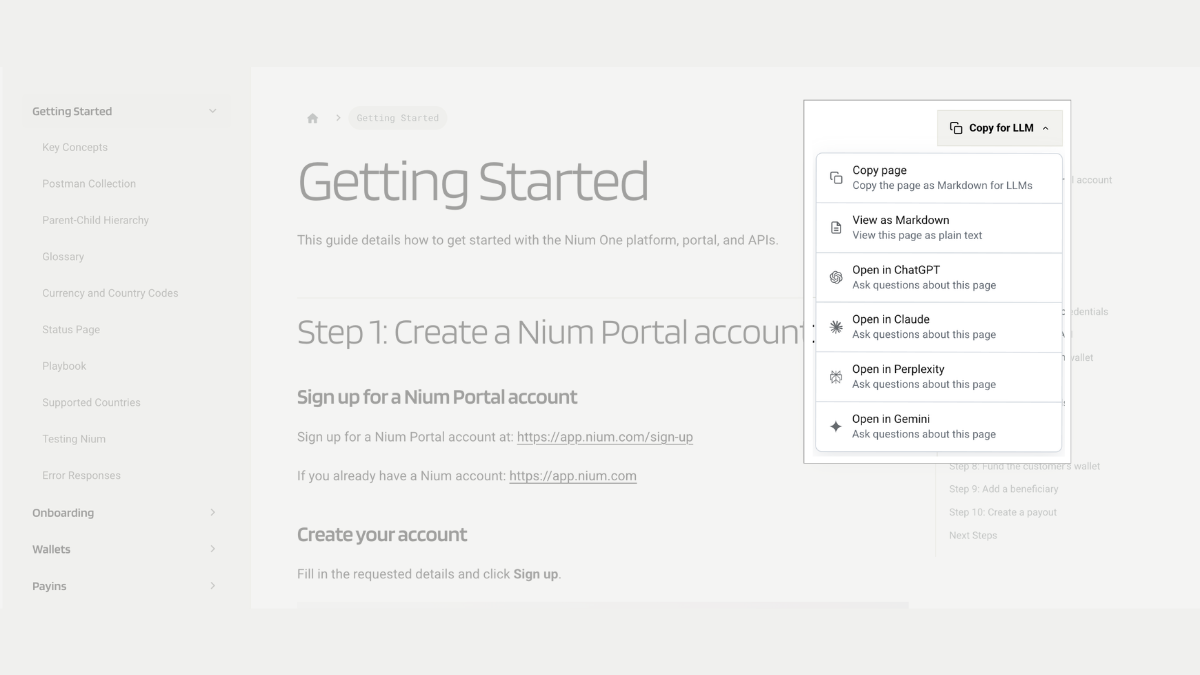
Every documentation page now has a "Copy for LLM" button. Click it and you get a menu with a few options: copy the page as markdown, view it as plain text, or open it directly in ChatGPT, Claude, Perplexity, or Gemini so you can start asking questions about that exact page to your favourite LLM.
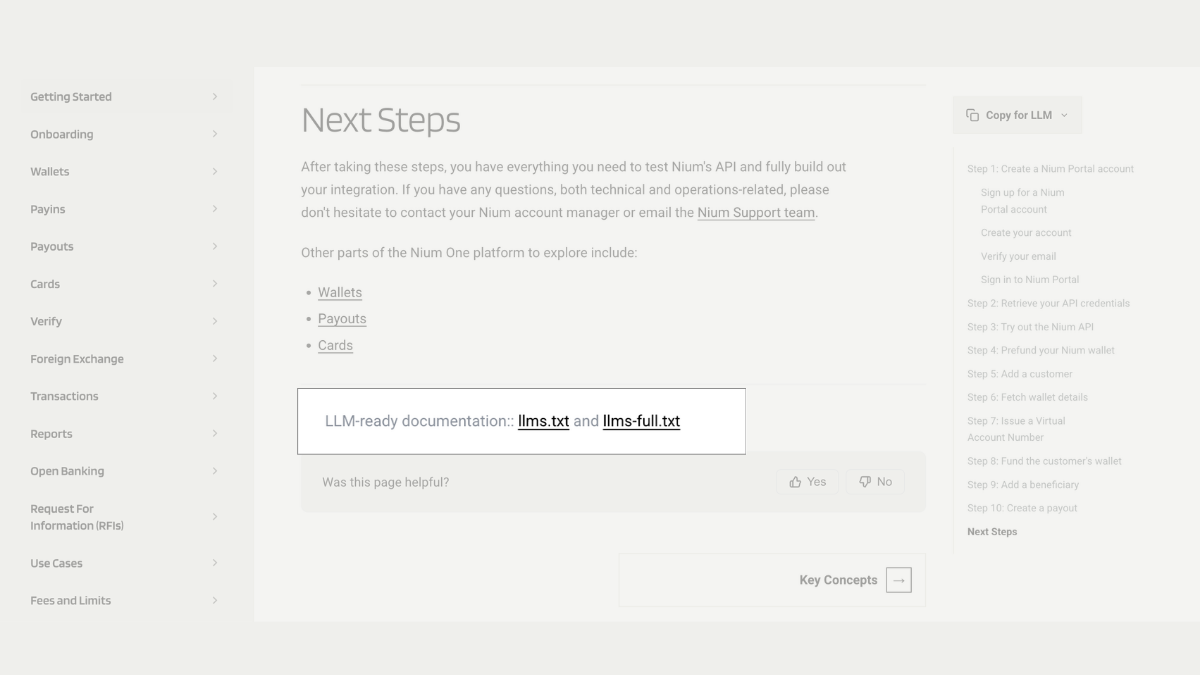
You can also index our documentation with llms.txt and llms-full.txt files, so you can plug our content straight into your own LLMs, AI coding assistants, or internal tools.
AI tools don't read pages the way humans do
When you open a documentation page in your browser, you see clean text, clear headings, and maybe a code sample or two. Easy to follow.
An AI tool doesn't see any of that. It sees the raw HTML underneath the page, which is full of things a human never notices: navigation menus, cookie banners, ads, footers, scripts, and formatting code.
All of that has to be stripped away before the AI can actually use the content, and it costs the AI real "space" to do it.
AI tools like ChatGPT, Claude, GitHub Copilot, and Cursor work within a limited context window, which is essentially how much text they can read and hold onto at once.
A typical HTML page can burn through far more of that budget than the same content in plain text, sometimes using several times more space than necessary, just parsing markup that has nothing to do with the actual answer.
The practical effect: an AI assistant answering a question about our platform might only get through part of the real content before running out of room, or it might misread a broken, JavaScript-heavy layout entirely and guess instead. That's how you end up with an AI-generated answer, or AI-generated code, that is close but wrong.
For a financial technology platform, "close but wrong" is a real problem, whether it happens to a customer researching us or a developer integrating with our API.
Making our documentation easier for AI tools to use
More people are turning to AI first for research, comparisons, and technical work. That means the quality of the source material matters. If AI tools can access documentation clearly and completely, they’re more likely to return accurate answers. If they can’t, important context can be missed, misread, or guessed at.
We’d rather be understood correctly. This update is one step towards making sure our documentation works just as well for the AI tools people use as it does for the people reading it directly. So we applied three updates to make it easier for anyone to work with Nium documentation.
1. The 'Copy for LLM' button
At the top of every documentation page, you'll find a Copy for LLM button. Open it and you get a menu of options:
- Copy page — copies the entire page as clean Markdown, no navigation clutter, no HTML tags, just the actual content and code samples.
- View as Markdown — opens the same version as plain text in your browser; useful if you just want to see what an AI tool would see.
- Open in ChatGPT (or Claude, Perplexity, Gemini) — sends the page straight to your AI assistant of choice, ready for you to start asking questions about it immediately.
If you're using an AI coding assistant, you can paste that Markdown straight into your prompt so the assistant is working from the real, complete page instead of a scraped, partial version of it. If you just want a quick answer about how something works, the "Open in..." options skip the copy-paste step entirely.
2. llms.txt
llms.txt is a simple index file, similar in spirit to how sitemap.xml helps search engines understand a site's structure, except this one is written for AI tools.
It lives at a predictable web address and gives any AI agent a clean map of our documentation: what exists, where it lives, and a short description of each section. Instead of an AI tool crawling and guessing its way around our site, it can go straight to the page it needs.
3. llms-full.txt
llms-full.txt goes a step further: it's the complete documentation, including full code samples, in a single file.
Instead of an AI tool making dozens of separate requests to piece together how something works, it can retrieve everything relevant in one go. This matters most for complex, multi-step topics, where an AI assistant needs to see requirements, parameters, and examples together to generate correct, working code on the first attempt rather than guessing at the gaps.
LLM-friendly documentation helps everyone
It's easy to assume this only matters to engineers. It doesn't.
- If you're evaluating us as a customer, you might ask an AI tool to summarize how our platform works or compare it to alternatives. Clean source material means that summary is actually accurate, instead of a best guess stitched together from a messy webpage.
- If you're a partner or developer integrating with our API, your AI coding assistant can now pull complete, correctly-typed documentation directly, which means fewer hallucinated parameters, fewer broken first attempts, and faster integration.
- If you just want accurate information about us, wherever it comes from, this is part of making sure that happens, whether the reader is a person or the AI they're using to help them.
Try it yourself: look for the Copy for LLM button on any documentation page, or point your AI tool at our llms.txt and llms-full.txt files present at the end of each page in our docs.